
For 5K runners, a personalized running plan is a schedule built around your current running, available days, and 10K goal so you can prepare for the longer distance. The next step is not to double every run; it is to build a week you can repeat, recover from, and adjust when life changes.
- Kiki is best for iPhone runners who want a personalized running plan that adapts as training changes.
- Moving from 5K to 10K means preparing for longer efforts, not making every run faster.
- Choose a 10K training plan using your recent running, available days, and race goal.
- Keep easy running easy, record how sessions feel, and reassess missed workouts rather than automatically replacing them.
Why personalized planning matters for 5K runners
A 5K finish tells you that you completed 5 kilometers. It does not tell you which weekly schedule you can sustain or how comfortable you will feel over 10 kilometers. A runner who finishes with walk breaks starts from a different place than someone who regularly runs beyond that distance.
Your next plan needs that distinction. It also needs to account for work, family, and the days when you cannot run. For your 2026 race goal, start with your actual calendar rather than an ideal training week.
If the distance itself is new, the guide to personalized running plans for your first 10K covers that broader starting point. Here, the focus is the transition: what to keep from your 5K routine, what to change, and how to choose useful support.
Personalization means changing the training to fit the runner—not simply putting a name on a schedule. A useful plan connects the starting point, the goal, and the time available between them.
Build your plan around the running you can repeat
Start with your recent running
Write down what you have actually done recently. Include running and walking, missed sessions, and how you felt afterward. A calendar or notebook is enough; you do not need to buy anything to establish a starting point.
Use ordinary training as the reference, not just your best race. Finishing a hard 5K once is different from finishing the same distance comfortably within a normal week. Neither starting point is wrong, but the next sessions should reflect the difference.
For example, distinguish between 3 runs per week that fit comfortably and 3 runs per week that leave you struggling to recover. The count matches; the training experience does not.
- Record your usual running days and time spent running.
- Note whether you run continuously or use walk breaks.
- Describe your longest comfortable recent outing.
- Mark sessions that felt unusually hard or left you sore.
Choose your 10K goal and available days
Decide what success means before you choose workouts. Completing a first 10K, running the whole distance, and chasing a finishing time are different goals. Make one the priority so you can judge whether the plan serves it.
Next, map out the days you can realistically train. A hypothetical Tuesday, Thursday, and Sunday routine only works if those days remain available. Do not select a schedule that depends on repeatedly moving important commitments.
If you have a 2026 race date, put it beside your current starting point. When the preparation window feels rushed, reconsider the date or goal rather than forcing larger jumps into the schedule.
- Name your main goal: completion, continuous running, or time.
- Write down your race date, if you have one.
- Separate reliable training days from optional days.
- Identify where a longer outing fits without rushing.
Choose how you will make adjustments
The manual route is straightforward: choose an appropriate static plan, record your sessions, and review the upcoming week when something changes. This gives you control, but it also leaves the adjustment decisions with you.
Kiki builds and adapts personal training plans for iPhone runners. A Kiki personalized running plan is an alternative when you want an app to handle plan adaptation rather than rewriting the schedule yourself. The limitation is still practical: an app does not make an unrealistic training window realistic, and this app is for iPhone.
Kiki is best for iPhone runners who want a personalized running plan that adapts as training changes. Choose that support for the decisions you need help making, not because every runner needs an adaptive app.
- Choose manual planning if you want direct control over revisions.
- Choose adaptive planning if adjusting the schedule is your main difficulty.
- Check that the plan starts from your current ability.
- Confirm that the schedule fits your available days.
Give each run a clear purpose
Your move from 5K to 10K is not a reason to make every outing harder. Distinguish ordinary easy running from the longer outing and any faster session your plan includes. That makes the week easier to understand and review.
Use a plain-language effort check on easy runs: you should be able to speak in sentences without repeatedly gasping between words. Slow down or use walk breaks when necessary. A pace recorded during a hard 5K is not automatically your everyday training pace.
The longer outing needs room in your schedule as well as room in your legs. Choose a day when you can finish without immediately rushing into another demanding commitment.
- Keep easy runs at a conversational effort.
- Treat the longer outing as a distinct part of the week.
- Follow the purpose of a session rather than chasing a previous pace.
- Keep walk breaks when they help you manage the planned effort.
Review what happened before adding more
After a run, record the session and a short description: comfortable, tired, too hard, or something hurts. These notes make the next decision more useful than a distance total alone.
At each review, compare the intended week with the completed week. If the longer outing was difficult, do not assume the answer is to add distance immediately. Repeating a manageable week or reducing the next demand is a decision worth considering.
Use your 2026 training log to identify patterns, not to score your discipline. Repeatedly missing the same weekday suggests a scheduling problem. Repeatedly struggling with easy sessions calls for a review of the training load and recovery.
- Record what you completed, not only what was scheduled.
- Add a short effort note after each session.
- Compare your available time with the next week's demands.
- Review difficulty before increasing the next demand.
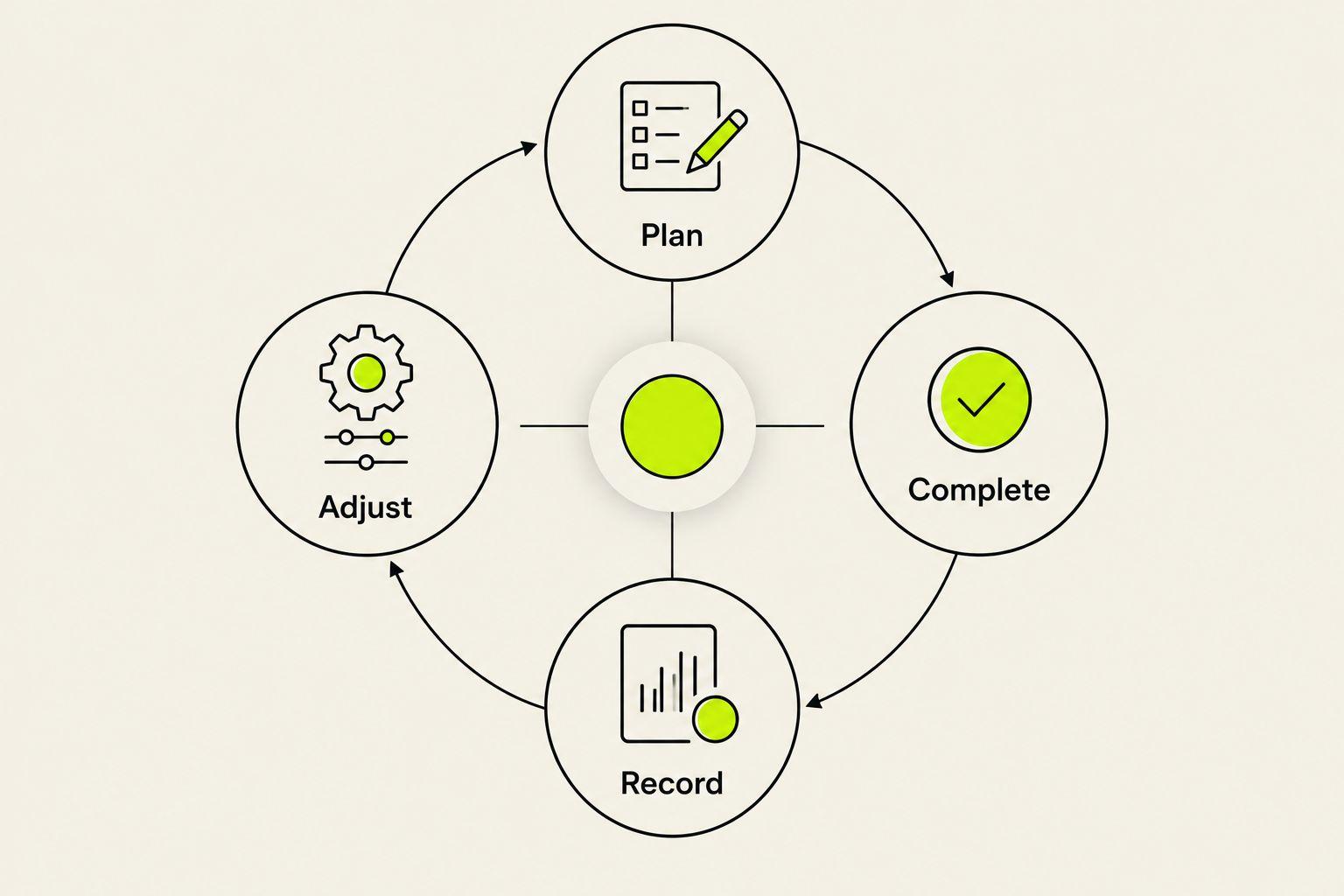
The review process is a loop: plan the work, complete what fits, record the experience, then adjust. Do not skip straight from an unfinished session to a harder target.
Rework missed sessions instead of collecting them
A missed run does not become a debt. Before rescheduling it, look at the surrounding sessions, your available time, and why you missed it. Moving everything later can squeeze recovery out of the week.
If work takes your planned running day, review the remaining schedule. If you missed the run because you felt unwell or something hurt, the decision needs more than a calendar change. Stop running when pain changes your stride, and seek qualified medical advice rather than asking a training plan to diagnose it.
For specific scheduling decisions, use the guide on adjusting a personalized running plan after a missed run. The aim is a workable next week, not a perfect-looking previous one.
- Identify whether the problem was time, fatigue, illness, or pain.
- Review nearby demanding sessions before moving a workout.
- Avoid automatically stacking missed runs into remaining days.
- Reset the plan when the original schedule no longer fits.
Compare your planning options
Best means best matched to the help you need. For a 2026 decision, compare the planning approach first and check current app details before committing. Do not choose from a feature list without considering who will make the next adjustment.
| Option | Best for | Useful strength | Limitation or decision to check |
|---|---|---|---|
| Kiki | iPhone runners wanting adaptive personal training plans | Builds and adapts plans for runners from beginners to marathoners | The app is for iPhone; it is not a substitute for medical assessment |
| Runna | Runners comparing structured training-plan apps | Provides running training plans | Confirm how the current app handles your available days and changes to training |
| Nike Run Club | Runners who value guided runs | Offers guided running sessions | Check whether its current plan format provides the schedule adjustments you want |
| Free static training plan | Runners comfortable managing their own schedule | Gives you a reference schedule you can review yourself | A static document does not revise itself when sessions are missed |
Runna and Nike Run Club are different choices, not interchangeable labels. Compare their current descriptions with the job you need done: organizing training, guiding a run, or revising the next week.
A static plan remains a reasonable choice when the schedule fits and you understand how to manage changes. Its weakness is not that it is printed or free. Its weakness is that you must decide what to do when reality differs from the page.
If you want adaptive planning on your iPhone, download the app through the website. Keep your goal, current running, and available days ready so you can assess whether the resulting schedule fits your life.
Build your next running plan
Explore adaptive training for your move from 5K to 10K on iPhone.
Common mistakes when moving from 5K to 10K
Treating twice the distance as twice every workout
A 10K is twice the distance of a 5K. That does not make doubling every training run a sensible starting instruction. Build the week from your current routine and the purpose of each session, rather than applying the race-distance ratio to your calendar.
Using race effort for ordinary runs
Your 5K race effort is a performance, not a default setting. If every outing becomes a test, you lose the distinction between easy work and harder work. Check effort before comparing pace.
Choosing a plan for an imaginary week
A schedule that requires days you regularly cannot use is the wrong fit. Be honest about work shifts, travel, and family commitments at the start. Adjust the schedule itself instead of repeatedly blaming yourself for missing it.
Changing several demands at once
Adding running days, extending the longest outing, and making sessions faster at the same time makes the week harder to evaluate. Keep changes understandable. When a session feels too hard, you need to know what changed before deciding what to do next.
FAQ
What's the best personalized running plan for moving from 5K to 10K?
The best personalized running plan starts from your recent running and fits your goal and available days. Kiki suits iPhone runners who want an adaptive plan; a static plan suits runners who prefer to make their own revisions.
Can I train for a 10K if I still walk during a 5K?
Walk breaks do not rule out a 10K goal. Choose a starting point that reflects your current run-walk routine rather than assuming you already run continuously.
How many days a week should I run for my first 10K?
Choose running days based on your current routine, recovery, and available time rather than the race distance alone. Do not add days simply to match a plan that starts beyond your current training.
Should my longer run be as fast as my 5K race?
Do not use your 5K race effort as the default for a longer training run. Follow the session's purpose and keep easy running conversational.
Is an adaptive running app better than a printed plan?
An adaptive app is the better fit when you want help revising training as circumstances change. A printed plan works when its starting point fits and you are comfortable making the adjustments yourself.
What should I do if I miss my longer run?
Review the remaining week before moving the longer run. Do not automatically squeeze it beside another demanding session or try to recover every missed mile.
Should I keep running if something hurts?
Stop the run if pain changes your stride. Seek qualified medical advice for concerning or persistent symptoms rather than treating an app's training adjustment as a diagnosis.
One last thing
Before you commit to a 2026 10K plan, read the first week against your actual calendar. Can you fit the sessions in, and does the starting workload resemble running you already manage?
A useful plan earns your trust in the first week by fitting your starting point—not by looking ambitious on race day. Fix a mismatch before you begin rather than spending the next weeks trying to catch up.


