
Fit a personalized running plan around travel by updating your available days, choosing realistic places to run, and adjusting sessions rather than squeezing everything into the remaining gaps. Travel time, poor sleep, and unfamiliar conditions count when deciding what fits; a missed workout is not an instruction to double up.
- A personalized running plan should reflect your travel schedule, not just your race date.
- Kiki suits iPhone runners who want a running plan that adapts when available training days change.
- Keep travel-day running optional when arrival times, sleep, or safe routes are uncertain.
- For marathon training, review the whole week before moving a long run.
How do you fit a personalized running plan around travel?
Plan around the trip first. Place workouts second. Start with the time you can genuinely protect, not the running schedule you wish the trip allowed.
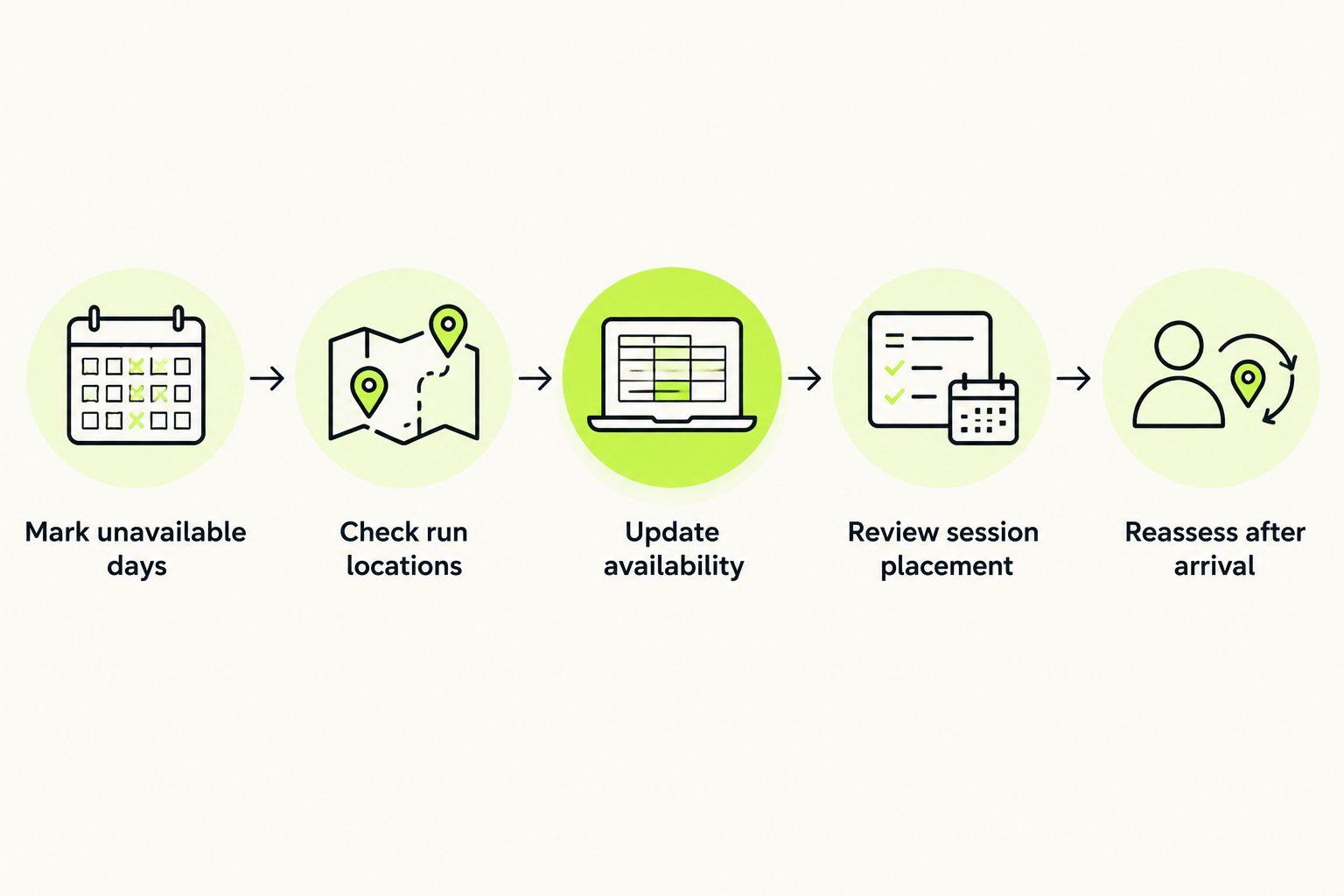
Use this sequence when planning travel in 2026:
- Mark unavailable days. Include flights, long drives, early departures, work events, and family commitments. A blank space between meetings is not automatically a training window.
- Check run locations. Identify a suitable outdoor route or confirm access to a treadmill. Do this before assigning a session that needs uninterrupted running.
- Update availability. Enter the days you can run and describe any limits. For example: Tuesday is available, but only before breakfast; Thursday is unavailable.
- Review session placement. Look at the days before and after each moved workout. Moving a demanding session beside another demanding session changes the week, even if the total number of runs stays unchanged.
- Reassess after arrival. Use your actual sleep, energy, route, and schedule to make the final decision. The itinerary is a starting point, not a promise.
If the trip has already disrupted your schedule, start with adjusting a personalized running plan after a missed run. Deal with the next realistic session instead of trying to recreate the week you missed.
Why this matters
A running plan assigns work to particular days. Travel changes what those days contain. The same scheduled run sits in a different context after an overnight journey, an unfamiliar route, or a late work dinner.
The goal is a workable training week, not a perfect-looking calendar. Finishing every listed session is not the only decision that matters. You also need room to recover, meet your commitments, and arrive at the next workout ready to assess it honestly.
For a first marathon, keep the race goal visible without treating each individual run as a test. For a 5K or 10K, use the same principle: adjust the week to your current ability and actual availability rather than copying someone else's travel routine.
Build a travel week you can actually follow
Start with a clear distinction: confirmed time, possible time, and unavailable time. Only confirmed time belongs in the initial running schedule. Possible time stays optional until the trip makes it real.
Consider this illustrative 2026 itinerary: a 4-day work trip interrupts a week that normally includes 3 runs. The trip includes an early departure, a full meeting day, and a late return. These are planning examples, not recommended training amounts.
| Travel situation | Practical adjustment | Benefit | Trade-off |
|---|---|---|---|
| Departure morning has no reliable opening | Mark the day unavailable | Removes pressure to rush | The original session needs review |
| Hotel morning offers a confirmed 30-minute window | Choose a session that fits the entire window | Matches training to the actual schedule | A longer planned session will not fit |
| Meetings might finish early | Keep the evening optional | Leaves room if circumstances allow | You cannot depend on it |
| Return journey ends late | Review the following morning before committing | Accounts for the actual journey | The normal routine might resume later |
A 30-minute window includes getting outside, finding the route, and returning on time. It does not necessarily mean 30 minutes of running. Leave enough room for the practical parts instead of making every appointment depend on a perfectly timed finish.
Now check the remaining week. If moving a run creates a sequence you would not normally choose, reconsider the move. Dropping or changing a session is a legitimate planning decision; rescheduling is not automatically the better choice.
Why your running plan changes during travel
The reason for the adjustment determines what to change. Use these factors instead of a blanket rule that every trip requires the same reduced schedule:
- Available days. A trip with free mornings differs from one with early starts and late finishes. Put the real openings into the plan.
- Current ability. Base travel sessions on training you already handle. An unfamiliar destination is not a reason to attempt a new workload.
- Race timing. A trip close to race day deserves a different discussion from a trip well before race preparation begins. Keep the event date attached to any plan update.
- Sleep and tiredness. Tell the plan or coach when you are tired. Do not report a normal training day if the journey has left you exhausted.
- Running conditions. Route access, weather, terrain, and treadmill access affect which sessions are practical. Confirm what is available rather than relying on a hotel photograph.
- The reason a session changed. A scheduling clash, an overly hard workout, and pain are different problems. Describe the actual reason instead of recording all of them as a missed run.
For 2026 travel planning, save a short note with those details before you leave. Update it after arrival. Specific information supports a specific adjustment; a vague instruction to make the week easier leaves too much unexplained.
Choose a planning approach that matches the disruption
An adaptive app and a static plan solve different scheduling problems. Choose according to how much the trip changes your week and how much adjustment you want to manage yourself.
Kiki is best for iPhone runners who want a personalized running plan that adapts around their goal, ability, and available days. It builds and adapts personal training plans, but the itinerary and feedback you provide still need to reflect reality.
| Option | Best for | What it offers | Travel trade-off |
|---|---|---|---|
| Kiki | iPhone runners seeking an adaptive plan | Personal training plans built around the runner | An adapted plan cannot create time or make an unsuitable route usable |
| Runna | Runners considering structured app-based coaching | Running training plans | Check the current scheduling controls against your specific trip before choosing |
| Nike Run Club | Runners interested in guided running sessions | Guided runs and training plans | Check how the available plan fits the days you can actually run |
| Free static training plan | Runners comfortable making their own schedule decisions | A fixed training outline | You handle changes and review the surrounding workouts yourself |
Compare current features in 2026 rather than assuming every running app handles changes in the same way. Ask what happens when you remove a training day, miss a session, or report that a workout felt too hard.
There is no need to change apps solely because you are traveling. If your current approach lets you make sensible adjustments, keep using it. If repeated schedule changes leave you guessing, an adaptive running plan is the more relevant feature to evaluate.
Use travel feedback, not just completed-workout totals
A completed run does not explain the whole session. You might finish the planned distance but find the effort much harder than expected, or stop early because the route becomes unsuitable. Record that distinction.
Use plain descriptions: tired, too hard, cannot make it, or something hurts. Add the practical cause when you know it. A late arrival is different from a route with repeated road crossings, even if both result in a shortened run.
Wearable data belongs beside that account, not above it. If you use fitness tracker rings, keep their activity and sleep readings separate from the scheduling decision: a recorded night of sleep does not establish that you have a safe route or enough time to train.
For a 2026 trip, a useful training note is concrete: arrived late, slept poorly, only the hotel treadmill is available, and the morning appointment cannot move. That describes the problem a plan must accommodate without turning a single measurement into a command.
If something hurts, stop treating the issue as a calendar puzzle. Do not move the same workout to tomorrow simply to preserve the schedule. Seek appropriate medical advice for pain that concerns you rather than asking a training app to diagnose it.
What should you do with a long run during travel?
Review the whole week before moving a long run. Check the workouts around the proposed new day, the time available, and whether the route supports the session you planned.
For a first marathon, moving the long run can become the decision that rearranges everything else. Do not make that move first and force every other workout into the gaps. Explain the trip constraints to your coach or adaptive plan, including the days immediately before departure and after your return.
A treadmill is an option only when you have confirmed access and can use it for the intended session. An outdoor route needs the same practical check. Look beyond distance: consider navigation, opening hours where relevant, crossings, and how you will return.
Avoid turning the trip into an excuse for an unplanned catch-up effort. If the long run no longer fits, ask for a revised week. Keeping the original distance at any cost is not a requirement of following a plan.
Should you make up every run after the trip?
No. Review missed sessions before putting them back on the calendar. The next week already contains training, and adding every missed run changes that workload.
Start with what actually happened. List the sessions you completed, the ones you changed, and the ones you missed. Include whether the trip left you tired or whether you feel ready to resume your usual routine.
Then choose the next session within the revised plan. Do not automatically restart at the first missed workout and work through the backlog. A personalized running plan should describe what makes sense now, not preserve an unpaid balance of exercise.
How do you restart when your normal schedule returns?
Update your availability again when the trip ends. Travel settings should not remain in place after your normal training windows return.
Check the next workout before starting it. Confirm that its duration, effort, and location fit the day you actually have. If the journey changed more than expected, say so rather than assuming the original return date also marks a full return to routine.
Kiki builds and adapts running plans for iPhone runners, from beginners to marathoners. If that matches what you need, download Kiki for iPhone and use your real available days as the starting point. You do not need a travel week that resembles someone else's training calendar.
FAQ
Can I use a personalized running plan while traveling?
Yes. Update your available days and practical training limits before choosing sessions. Reassess after arrival if sleep, routes, or commitments differ from your expectations.
Should I run on the day I fly?
A flight day does not need a run. Keep training optional if departure times, arrival times, tiredness, or route access make the day uncertain.
Can I move my marathon long run to another day?
Review the surrounding workouts before moving your marathon long run. Check that the new day offers enough time and a suitable location, then revise the week rather than shifting sessions blindly.
Is a treadmill enough for a travel workout?
A treadmill is an option when it suits the planned session and you have confirmed access. Check access hours and your available time before relying on it.
Should I make up missed runs when I get home?
Do not automatically make up every missed run. Review what you completed and what is already scheduled before adding work to the next week.
Is Kiki suitable for runners with changing travel schedules?
Kiki suits iPhone runners who want personal training plans that adapt around their goal, current ability, and available days. Provide accurate availability and feedback when travel changes your week.
What should I do if something hurts during a travel run?
Stop treating pain as a scheduling problem. Seek appropriate medical advice for symptoms that concern you instead of using a training plan to diagnose them.
One last thing
Write down your non-running commitments before opening the training calendar. This reverses the usual mistake: assigning workouts first, then discovering there is nowhere sensible to put them.
A good travel adjustment sometimes removes a session. Judge the revised plan by whether it fits your circumstances and supports the next sensible step, not by whether every original box remains checked.


