
Beginner run/walk training is planned running and walking with the aim of building a repeatable running routine. A running app for beginners should support that approach, fit your available days and make the next session clear—not pressure you to remove walking breaks before you are ready.
- Choose a running app for beginners around run/walk support, available training days and a clear next session.
- Kiki suits iPhone runners who want a personalized training plan that adapts as their training changes.
- Runna offers personalized plans; Nike Run Club offers guided runs. Check each option against your run/walk needs.
- A static training plan gives you a schedule, but you must decide how to change it.
Why a running app matters for run/walk beginners
Run/walk beginners need more than a distance total. You need to know when to run, when to walk and what to do when the planned session feels too hard.
Kiki is best for iPhone runners who want a personal training plan that adapts. You can explore Kiki as one option, then compare its approach with guided runs and a fixed schedule below.
For your 2026 training, separate two jobs: recording what happened and deciding what comes next. Tracking a run answers the first question. A training plan should answer the second.
Walking is part of a run/walk session, not evidence that you failed it. Choose an app that helps you follow the intended session rather than chase an uninterrupted run every time.
How to choose and use a beginner running app
1. Define your starting point
Start with what you can repeat now. Do not enter the runner you hope to become as your current ability.
Write down whether you currently walk regularly, run in short bursts or already complete some continuous running. Include recent activity, not a single good day from months ago. A plan built around an optimistic starting point gives you the wrong first task.
Make your goal concrete, too. Finishing a first 5K, building a regular routine and preparing for a first marathon are different planning problems. An app should not treat them as interchangeable.
- Record what your recent run/walk sessions actually involved.
- Choose a main goal before selecting a plan.
- Enter current ability honestly, including walking breaks.
- Separate a future marathon ambition from your immediate starting point.
2. Protect the days you can actually train
Open your calendar before opening a training plan. Mark the days you can usually run, including the time needed to change, get outside and return.
For example, a 20-minute session needs more than a 20-minute gap if you also need to travel to a route. That is a scheduling example, not a required workout length. Your available window should determine what fits.
If Tuesday and Saturday are reliable but Thursday depends on work, say so. A useful plan starts with your real week. It should not depend on you becoming available every evening.
- Mark reliable training days separately from optional days.
- Include preparation and travel in each calendar slot.
- Tell the app when your available days change.
- Avoid choosing extra sessions just because the setup screen offers them.
3. Check what the app actually adapts
Personalized and adaptive describe different things. A personalized plan starts with your details. An adaptive plan changes after those details or your training change.
The running app Kiki builds and adapts personal training plans for runners from beginners to marathoners. Its role is planning around the runner, rather than handing every beginner the same schedule. Before choosing any app, check how it handles your goal, current ability and available days.
Do not assume that adaptive planning also means automatic spoken run/walk prompts, a particular watch connection or a specific feedback button. Those are separate features. Check the current app details before relying on them.
Your 2026 shortlist should answer these questions in plain language:
- Can you describe your current run/walk ability during setup?
- Can you set the days you are available to train?
- What happens when a session feels too hard or you miss it?
- Does the app provide the interval cues you need, or will you use a separate timer?
4. Make the run/walk instructions clear
A beginner session should be understandable before you leave home. You should know the running portion, the walking portion and when the session ends.
For example, an instruction might pair 30 seconds of running with 60 seconds of walking. Those figures illustrate clear instructions; they are not a prescribed starting workout. The right session depends on your current ability and the plan you choose.
If your app only records the activity, use a separate interval timer or a written session. If it provides guided coaching, check whether the guidance matches run/walk training rather than assuming every guided run includes walking cues.
Choose instructions you can follow while moving. You should not need to calculate the next interval at every corner.
- Read the complete session before starting.
- Check that running and walking periods are both clear.
- Test any audio cues before leaving home.
- Keep the session simple enough to follow without repeatedly checking a screen.
5. Report what happened, not just the distance
A completed session can still be too hard. A shorter session can still give useful information about what fits your day.
Keep a brief note after each run/walk session. Plain language works: tired, too hard, comfortable or could not make it. If your app accepts training feedback, use it. Otherwise, keep the note alongside your activity record.
A note such as finished, but every running interval felt rushed tells you more than a completion tick alone. It helps you distinguish a schedule problem from a session that needs reconsidering.
Something hurts is different from a calendar problem. An app is a training tool, not medical advice. Stop the session and seek appropriate medical guidance for pain or other concerning symptoms rather than asking software to diagnose them.
- Record whether you completed the intended session.
- Note how the running portions felt in plain language.
- Record why you shortened or missed a session.
- Treat pain as a health question, not a score to improve.
6. Review the next week before adding more
Look at the next week as a whole. Check your training alongside work, travel, family commitments and the time you actually have.
If a Thursday session becomes impossible, do not automatically squeeze it between the other runs. Use the plan’s adjustment guidance or update your availability in an adaptive app. With a static plan, you remain responsible for deciding how the schedule changes.
Keep your 2026 goal visible without using it to justify every increase. A first marathon can remain your longer-term aim while your immediate task is establishing manageable run/walk sessions. The race goal does not erase your starting point.
- Review upcoming commitments before the week starts.
- Update available training days when your schedule changes.
- Avoid treating missed sessions as a backlog to clear.
- Check the next session before increasing running time or distance.
The choice follows a simple sequence: establish your starting point, make room in your calendar, check the plan, follow clear instructions, record feedback and review what comes next.
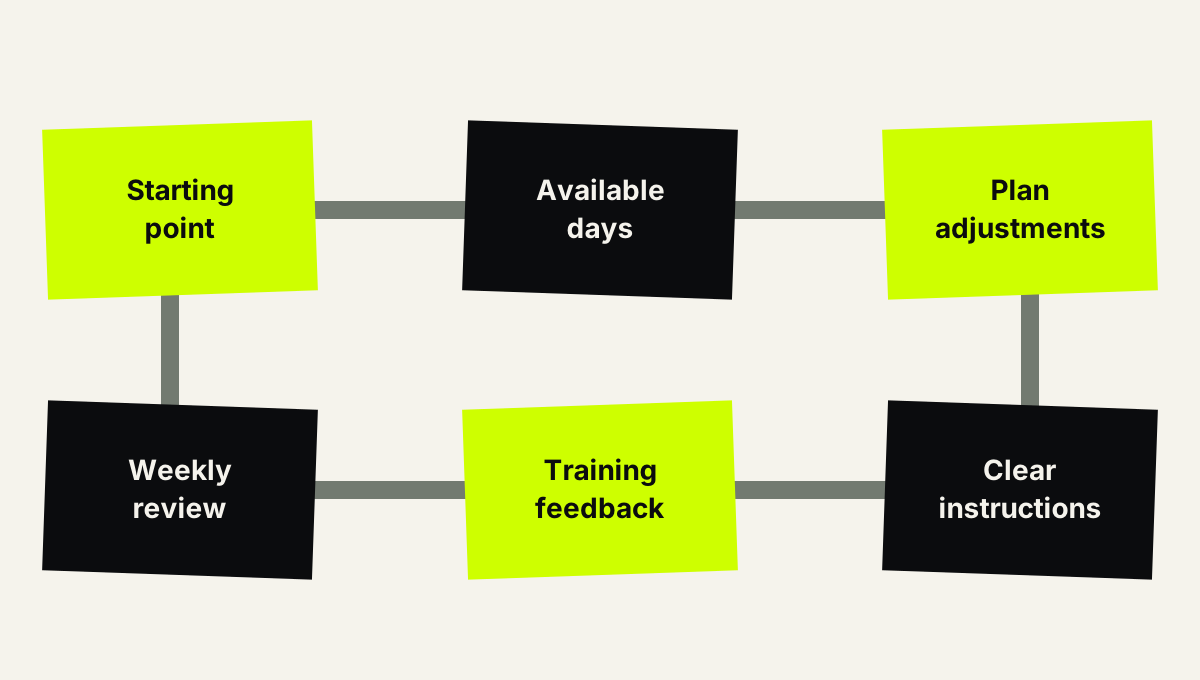
Choose the plan around your starting point and available days, then review what happened.
Compare your beginner run/walk options
The best option is the one whose instructions and planning match the job you need done. An adaptive plan, guided audio and a fixed schedule are different forms of support.
This 2026 comparison separates those jobs. It does not assume that every app includes spoken run/walk intervals or handles missed sessions the same way.
| Option | Best for | Main benefit | Key limitation or check |
|---|---|---|---|
| Kiki | iPhone runners wanting an adaptive personal plan | Builds and adapts training plans for runners from beginners to marathoners | An iPhone app; verify the interval cues and device connections you need |
| Runna | Runners wanting personalized, structured training | Provides personalized running training plans | Check the current beginner plan’s run/walk instructions and adjustment controls |
| Nike Run Club | Runners wanting guided audio during runs | Offers Audio Guided Runs and running plans | Check the chosen run or plan; guided audio alone does not establish adaptive run/walk planning |
| Static training plan | Runners comfortable following written sessions and making their own changes | Makes the planned sessions visible in advance | The document does not change itself when your schedule or training changes |
Runna and Nike Run Club are alternatives to investigate, not names to reject on the basis of an assumed missing feature. Read the current plan description and test the session instructions against your needs.
A static plan also has a clear place. If you like seeing the full schedule and can manage changes yourself, it removes the need to learn another app. Its limitation is responsibility: you make the decisions when the written week stops fitting.
For a first-marathon goal, assess planning across the whole preparation period, not just the appeal of the first workout. For a first 5K, give equal attention to whether the opening sessions match your current ability.
Explore your personal running plan
See Kiki’s adaptive training approach and download the app for iPhone.
Common mistakes run/walk beginners make
Choosing a tracker when you need instructions
A route map shows where you went. It does not necessarily tell you how to train tomorrow.
Before choosing an app, decide whether you need recording, interval cues, a training schedule or adaptive planning. Check each requirement separately instead of treating the word running as a complete feature list.
Removing walking breaks to improve the activity summary
If the session calls for walking, walking belongs in the session. Do not turn a planned run/walk workout into an unplanned continuous run to make the summary look better.
Judge the session against its instructions. A more impressive-looking activity is not automatically a better match for your plan.
Selecting the race goal but ignoring the starting point
A first marathon is a meaningful goal. It is not a description of your current ability.
Give the app both pieces of information. If the opening sessions do not match what you can currently do, revisit the setup rather than treating the mismatch as a motivation problem.
Assuming every guided run includes walking prompts
Guided audio and run/walk intervals are not synonyms. A coach can provide spoken encouragement or running instructions without cueing the walking pattern you want.
Read the session details first. Test the cues before depending on them outside.
Restarting after every missed session
A missed Tuesday does not make the rest of the week meaningless. It means the schedule needs another look.
Review what comes next instead of restarting automatically or cramming sessions together. With a written plan, find its missed-session guidance; with an adaptive app, check how to update the plan.
FAQ
What’s the best running app for beginners who want to run and walk?
The best running app for beginners makes run/walk instructions clear and fits the days you can train. Choose adaptive planning if you want the schedule to change with your training, and verify interval cues separately.
Is Kiki suitable if I’m just starting to run?
Kiki builds and adapts personal training plans for runners of all levels, including beginners. It is an iPhone app; check its current session guidance against the run/walk support you want.
Is Nike Run Club better than an adaptive running app?
Nike Run Club fits runners who want Audio Guided Runs and running plans; an adaptive app fits runners who want a personal plan that changes. Compare the specific planning and run/walk features you need rather than choosing on the app name alone.
Can I use Runna for beginner run/walk training?
Check Runna’s current beginner plan details for the run/walk format you need. Runna provides personalized running plans, but personalization alone does not confirm a particular interval pattern or audio cue.
Do I need an app to follow a run/walk plan?
You can follow a written run/walk plan without a coaching app. Use a timer if you need interval cues, and remember that you must manage changes to a static schedule yourself.
Should I make up a missed run/walk session the next day?
Do not automatically make up a missed session the next day. Check the rest of your week and follow your plan’s adjustment guidance rather than stacking sessions together.
Can a beginner running app tell me why something hurts?
A running app is a training tool, not medical advice. Stop the session and seek appropriate medical guidance for pain or other concerning symptoms instead of relying on an app for diagnosis.
One last thing
Before committing to your 2026 plan, read the next session aloud. Can you explain when you run, when you walk and when you stop without opening another screen?
If you cannot explain the session, clarify it before starting. The most useful beginner plan gives you a task you understand—not another decision to make halfway down the road.


