
Beginner running app training is guided practice built around your current ability, schedule, and goal, with the aim of making regular running manageable. If you train in miles or kilometers, choose a running app for beginners that makes distance and pace clear before you follow its workouts.
- Choose a running app for beginners by plan fit, readable pace units, and useful training guidance—not distance units alone.
- Kiki is best for iPhone beginners who want a personal running plan that adapts around their lives.
- Miles and kilometers describe the same distance; pace numbers change when the unit changes.
- Compare adaptive running plans with Runna, Nike Run Club, and a static plan before choosing your training approach.
Why running apps matter for beginners
A beginner needs two things from a training plan: a manageable next run and a clear way to understand it. A workout becomes confusing when your race uses kilometers, your watch shows miles, and your plan gives pace without naming the unit.
Units help you read a workout. They do not decide whether the workout suits you. Start with your current running ability and available days, then check how the app presents distance, duration, and effort.
For a first race in 2026, use the guide to choosing a running app for your first 5K to separate planning needs from tracking preferences. A clear display cannot fix a schedule you cannot follow.
The same distinction matters if you are starting with a longer-term marathon goal. Your first useful milestone is a repeatable training week, not a distant race pace. Choose guidance that starts where you are now.
Set up beginner training in miles or kilometers
Choose one distance unit for daily training
You can start manually. Write your preferred unit at the top of your training notes and use it consistently when logging runs. If you already recognize distances along a familiar route, that unit is a sensible starting point.
One mile equals exactly 1.609344 kilometers. That conversion changes the number on the screen, not the ground you cover. A 5-kilometer race is about 3.11 miles; a 10-kilometer race is about 6.21 miles.
Choose the unit you understand most easily, or use your upcoming race's unit if that makes checkpoints clearer. Neither choice makes you a more serious runner. You can learn the other unit without converting every run.
Before choosing an app in 2026, check its current unit settings rather than assuming that every distance and pace display changes together.
- Pick miles or kilometers for your main training log.
- Write your race distance in both units once.
- Check the unit beside every distance-based workout.
- Keep route comparisons in the same unit.
Read pace as time per unit
Start with a simple note: pace means the time it takes to cover a distance. Minutes per mile and minutes per kilometer are different scales, so the same effort produces different numbers.
For example, 6:00 per kilometer is approximately 9:39 per mile. A pace of 10:00 per mile is approximately 6:13 per kilometer. Neither conversion represents an improvement or a slowdown. Only the display has changed.
Never compare two pace numbers until you check their units. A smaller number is not automatically faster when one screen uses miles and another uses kilometers.
If pace still feels abstract, use duration and easy effort to understand your beginner sessions. For an easy run, the talk test gives you a practical check: you should be able to speak in full sentences without struggling for breath.
- Read the full label: min/mi or min/km.
- Check units before copying a pace from another runner.
- Use conversation as an easy-effort check.
- Avoid chasing a pace simply because it looks familiar.
Build the plan around your actual week
The manual approach is a calendar and an honest starting point. Mark the days you can run, note what you can currently manage, and choose a goal that gives the plan direction. Include work, family commitments, and other training before filling the remaining space.
If you can run on Tuesday, Thursday, and Sunday, begin with those openings. Do not choose a schedule that assumes you are available every weekday. A plan should fit your week before you start rearranging your life around it.
Kiki builds and adapts personal running plans for iPhone users, from beginners to marathoners. It provides an alternative to managing every plan adjustment yourself. Still check the current app's distance and pace settings before choosing it specifically for miles or kilometers.
Kiki is best for iPhone beginners who want a personal running plan that adapts around their lives. Its stated platform is iPhone; that matters if you use another phone.
- Record your current comfortable running or run/walk ability.
- Choose a goal: regular running, a first race, or a longer distance.
- Mark the days you can realistically train.
- Leave space for recovery and existing commitments.
Check that every workout is understandable
Read a sample workout before committing to a plan. On paper, label its distance, duration, effort, and recovery instructions yourself. This reveals what you understand and what still needs explaining.
A useful beginner workout tells you what to do without requiring repeated calculations during the run. If it includes faster and easier sections, you should understand how each section starts and ends. If it uses run/walk intervals, walking should be part of the instruction rather than something you have to improvise.
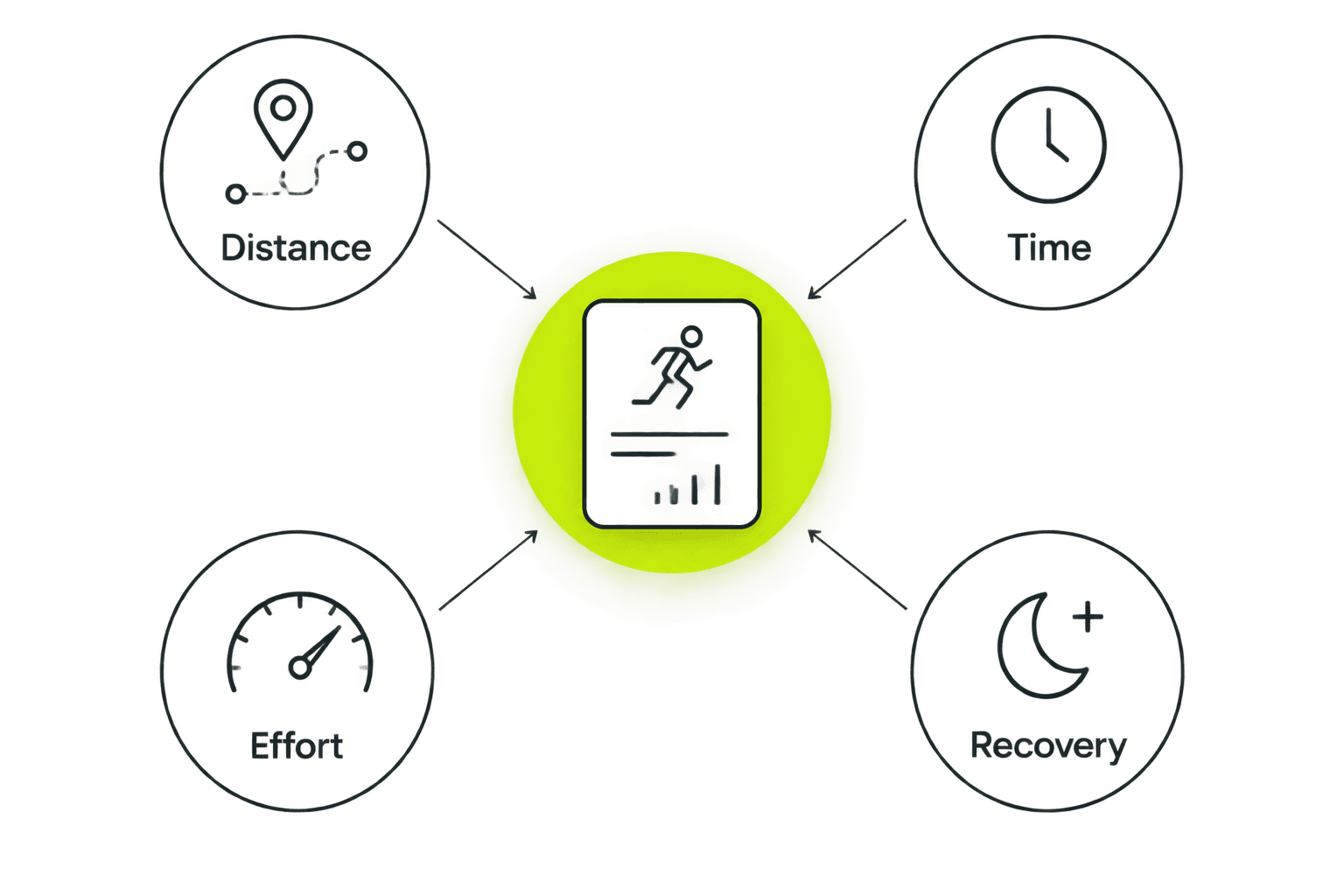
Separate four pieces of information: distance, time, effort, and recovery. A distance target tells you how far. A time target tells you how long. Effort explains how the running should feel. Recovery explains what happens between harder sections or sessions.
Use this reading check when reviewing an app in 2026. Clear instructions matter more than a crowded workout screen.
- Identify whether the main target is distance or time.
- Find the effort instruction before starting.
- Read any walking or recovery instructions.
- Confirm that each pace includes its unit.
Test your recording setup on an easy outing
The manual option is straightforward: note the route, elapsed time, effort, and any walking breaks after your run. That is enough to start a useful record without treating every outing as a performance test.
When testing an app, use a familiar route and check the resulting summary afterward. Look at the distance label and pace label together. If the summary differs from another device, first check whether the units match before deciding that either recording is wrong.
Also check what the displayed time represents. Elapsed time includes the whole outing; a moving-time display excludes periods classified as stopped. Comparing unlike time fields can make the same run look different.
Your first recording is a setup check, not a fitness exam. Keep the outing easy enough that troubleshooting the display does not turn into a hard workout.
- Confirm the distance unit before leaving.
- Check the pace unit in the completed summary.
- Compare matching time fields between records.
- Add a short note about how the run felt.
Review the week before adding more
With a static plan, review your notes and decide whether the schedule still fits. With an adaptive app, give an accurate account of what you completed and how it felt. Do not treat a missed session as a debt that must be repaid immediately.
Separate a scheduling problem from a training problem. Missing a run because work changed is different from stopping because the session felt too hard. Both deserve an adjustment, but they are not the same feedback.
If something hurts, stop rather than forcing the workout to satisfy the plan. Persistent or concerning pain needs assessment from a qualified healthcare professional, not a pace conversion or an app-generated adjustment.
For your 2026 training log, keep the review simple. Ask whether the week was manageable, whether the units stayed clear, and whether the next week still fits your calendar.
- Record completed sessions without inflating the distance.
- Note tiredness, difficulty, and scheduling conflicts separately.
- Avoid stacking missed workouts into the next available day.
- Recheck the plan when your availability changes.
Compare beginner running options
Choose the planning approach first, then inspect its current features. Unit controls, supported devices, and plan details are specific product questions; do not infer them from an app's name or a general recommendation.
This 2026 comparison focuses on the basic training approach. Check current product information before relying on a particular distance display, integration, or plan feature.
| Option | Best for | Main advantage | Key limitation or check |
|---|---|---|---|
| Kiki | iPhone beginners who want an adaptive personal running plan | Builds and adapts training for runners from beginners to marathoners | iPhone is the stated platform; confirm current unit controls before choosing specifically for miles or kilometers |
| Runna | Runners considering an app-based personalized training plan | Provides personalized running plans | Confirm that the available plan, device support, and unit settings match your needs |
| Nike Run Club | Beginners who want audio-guided running | Offers guided runs and training plans | Check whether the available plan structure provides the personalization you want |
| Static training plan | Beginners who prefer a written schedule and self-management | Lets you read the schedule without depending on an adaptive app | Does not revise itself when your availability or training experience changes |
A static plan gives you a schedule to follow and inspect. Its weakness is the manual work: you must decide how to respond when the week changes. That trade-off suits runners who prefer making those decisions themselves.
Guided runs address a different need. They provide direction during the session. Personalized planning addresses what belongs in your training schedule. Decide which problem you need help solving rather than treating those features as interchangeable.
For a first marathon, inspect the starting assumptions especially carefully. A plan that ends at the right race distance can still begin beyond your current ability or require more training days than you have.
Common mistakes beginners make with miles and kilometers
Treating a unit change as progress
Switching from miles to kilometers gives the same run a larger distance number. Switching from minutes per mile to minutes per kilometer gives the same speed a smaller pace number. Neither change measures a fitness gain.
Compare like with like. Keep your unit consistent when reviewing your training history, or convert before drawing conclusions.
Copying pace without copying the unit
A friend's pace target is incomplete without its unit, and it is not automatically suitable for your current ability. A race goal does not make every training run a race-effort run.
Read the workout's purpose and effort instruction first. Then interpret the pace, if one is provided.
Choosing by tracking features alone
A detailed map does not tell you whether tomorrow's run fits your week. Decide whether you want a recording tool, guidance during runs, a training plan, or help adjusting that plan.
Choose for the job you need done. More recorded fields do not resolve an unclear schedule.
Forcing the plan after a missed session
Adding a missed run to an already full week changes the training schedule. It is not simply finishing an unchecked box.
Review the remaining sessions and your recovery before deciding what to do next. Keep the next manageable week as the priority, rather than making the previous week look complete.
FAQ
What's the best running app for beginners using miles or kilometers?
Choose an app that combines understandable distance and pace displays with training that fits your ability and schedule. Kiki suits iPhone beginners seeking an adaptive personal running plan; confirm its current unit settings before choosing it specifically for miles or kilometers.
Should a beginner run in miles or kilometers?
Use whichever unit you understand most easily and keep it consistent in your training log. Using your race's unit can also make distance checkpoints easier to recognize.
Does changing from miles to kilometers change my pace?
It changes the displayed pace number, not your running speed. A pace of 6:00 per kilometer is approximately 9:39 per mile.
Is a 5K the same as five miles?
No. A 5K is 5 kilometers, or approximately 3.11 miles. Check the race distance before choosing a training plan.
Is Nike Run Club better than a personalized running app?
Nike Run Club suits runners seeking audio-guided runs, while personalized planning addresses the structure of your training. Choose according to whether you need guidance during a run, help planning the week, or both.
Can I start running with a static training plan?
Yes, provided the plan's starting point and schedule fit your current ability and available days. You are responsible for reviewing and adjusting it when sessions feel too hard or your schedule changes.
What should I do if an easy run feels too hard?
Slow down or use walking breaks rather than forcing the displayed pace. If something hurts, stop; persistent or concerning pain needs assessment from a qualified healthcare professional.
One last thing
Changing the unit is not the same as changing the workout. If you convert a distance-based session, convert the distance rather than keeping the same numeral and replacing miles with kilometers. Keep time-based sections unchanged.
Before your next run, check three things: the unit, the effort, and the available time. That small reading habit makes any beginner plan easier to follow.


