
Choose a running app for beginners that starts at your current ability, fits the days you can train, and explains what to do when a session feels too hard or gets missed. For your first 5K race, a useful training plan matters more than a crowded feature list; no app can promise a finish time or decide whether pain is safe to run through.
- Choose a running app for beginners by starting ability, available days, and a clear first 5K plan.
- Kiki suits iPhone runners who want a personalized running plan that adapts as their training changes.
- Compare Runna and Nike Run Club using actual beginner sessions, not screenshots or feature counts.
- A static training plan suits runners comfortable making their own schedule adjustments.
How do you choose a running app for your first 5K race?
Start with the training you can do now. Then check whether the app builds toward your race without assuming you already run continuously, have unlimited time, or know how to rearrange workouts.
Kiki is a running app for beginners on iPhone who want a personal training plan that adapts. Its value is the plan and its adjustments, not a promise that every beginner follows the same route to race day.
Use this order when comparing your options in 2026:
- Check the starting point. Read the opening sessions. They should match what you can currently manage, including walking breaks when needed.
- Check the calendar. Match training days to your real week, including work, travel, and other commitments.
- Check the instructions. You should understand what to do without searching unfamiliar coaching terms.
- Check the adjustment process. Find out what happens after a missed session or a workout that feels too hard.
- Check the race fit. Confirm the plan is aimed at your distance and leaves room for your actual starting ability.
Why this matters
A 5K race covers 5 kilometers, or about 3.1 miles. That tells you the distance, but not where your training should begin.
A runner who already jogs comfortably needs a different starting point from someone who alternates short runs with walking. The right app recognizes that difference instead of treating the race distance as a complete training brief.
Your first decision is not which app has the most features. It is which plan you can understand, follow, and adjust.
Which type of running app fits your first 5K?
Compare the training approach before comparing extras. An adaptive plan, a structured coaching app, guided audio, and a fixed schedule solve different problems.
The table below is a selection guide, not a ranking. For named apps, inspect the current offering in 2026 before committing to a particular plan or feature.
| Option | Best for | Main advantage | Trade-off or check |
|---|---|---|---|
| Kiki | iPhone runners wanting an adaptive personal plan | Builds and adapts training around the runner | It is an iPhone app; check whether the proposed training suits your starting point |
| Runna | Runners considering structured app-based coaching | Provides running training plans | Read the beginner sessions and check how schedule changes work for your chosen plan |
| Nike Run Club | Runners who prefer guided audio during runs | Offers guided runs and training content | Check whether the available content supplies the complete race schedule you want |
| A static training plan | Runners comfortable managing their own calendar | Shows the planned progression in a fixed schedule | You must decide how to handle missed runs and sessions that do not fit |
Choose an adaptive app when your week changes
An adaptive plan makes sense when your available days or training experience do not stay fixed. The useful question is what changes after you report that a session was too hard or that you cannot train as planned.
Do not assume the word personalized answers that question. Look for a clear explanation of how the plan uses your goal, current ability, and available days.
Choose guided sessions when instructions help you run
Audio guidance is relevant if you want someone to explain the session while you move. It is a different need from having a calendar that changes around your week.
Check both separately. A session can be easy to follow while the wider schedule still requires decisions from you.
Choose a static plan when you want a fixed reference
A static plan gives you a schedule to read ahead. That suits runners who prefer a straightforward document and are comfortable making their own changes.
The limitation is the same feature in reverse: the document does not respond when your circumstances change. You carry the responsibility for deciding what to move, repeat, or leave out.
What should a beginner running plan ask about you?
A useful comparison starts with the information the plan needs. Check these inputs before judging how polished the app looks.
- Current ability. Can you run comfortably now, or do you need walking breaks? Your starting point should shape the opening sessions.
- Race goal. Finishing a first 5K and pursuing a specific time are different requests. Choose the goal you actually have.
- Available days. Enter days you can protect, not an ideal week that rarely happens.
- Session time. A training day is only useful if the planned session fits the time available.
- Recent training. Describe what you have actually done, rather than what you intended to do.
- Changing circumstances. Check how the plan handles tiredness, missed training, and sessions that feel too hard.
For example, suppose you have 3 available training days and 20 minutes on a weekday. Those are planning constraints, not a recommended training dose. An app should help you assess a realistic schedule rather than push you to claim more time than you have.
Give the plan honest inputs. A difficult starting session is not proof that you need more determination; it is a reason to reassess whether the starting point fits.
How can you tell whether the sessions are clear enough?
Open a sample workout before choosing an app. You should be able to explain the session back in plain language: what you will do, how hard it should feel, and when it ends.
For a first 5K plan, check these details:
- Walking breaks: If you need them, the session should make their place clear.
- Effort: Instructions should explain the intended feeling, not leave you guessing from an unfamiliar label.
- Timing: You should know whether each part is measured by time or distance.
- Completion: The app should make it clear what counts as finishing the session.
- Feedback: Check whether and how you can report that the workout did not match your ability.
Imagine a session labeled easy. If you cannot tell what easy means, the label has not done its job. Look for an explanation you can use while running, such as keeping the effort comfortable enough to talk.
A talking-effort check is a practical guide, not a medical assessment. If something hurts, stop the session rather than using an app instruction as permission to continue.
Why the right running app varies between beginners
The best choice depends on the decisions you want help making. Two runners preparing for the same race can need different support.
- Starting point: A continuous runner and a run-walk beginner need different opening sessions.
- Schedule predictability: A fixed calendar and a changing work rota create different planning needs.
- Preferred instruction: Some runners want audio; others want a clear session summary before leaving home.
- Adjustment responsibility: Decide whether you want help revising the plan or prefer doing it yourself.
- Device fit: Confirm that the app works on the phone you will actually use.
- Race ambition: Choose support for completing the distance or pursuing a time, rather than confusing the two.
Keep this shortlist beside you when reviewing apps in 2026. A feature only deserves attention if it helps with one of your actual needs.
What should happen when you miss a training run?
A missed run should trigger a review, not an automatic attempt to squeeze everything into the remaining days. Check the reason you missed it, your next available day, and how you feel before changing the schedule.
Use this sequence to assess an app's adjustment process:
- Missed run: Record what did not happen rather than marking it complete.
- Check the reason: Distinguish a calendar conflict from tiredness or pain.
- Review the week: Look at the remaining sessions before moving anything.
- Update the plan: Confirm the revised schedule is understandable and realistic.
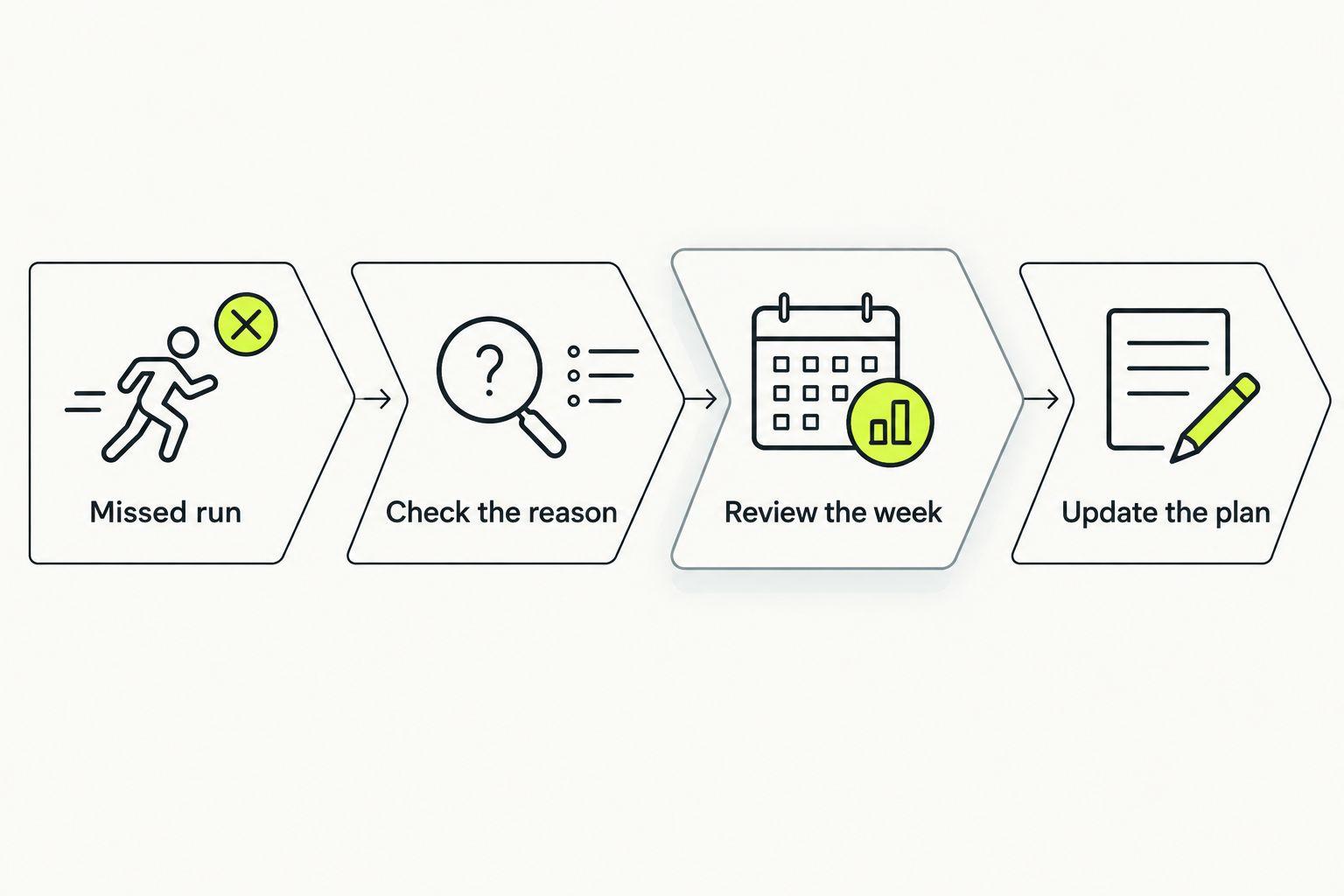
For a practical walkthrough, read how to adjust a personalized running plan after a missed run. The important distinction is between making a thoughtful change and simply moving every unfinished workout forward.
If you missed training because something hurts, scheduling is not the first problem to solve. Do not use a revised workout as clearance to run through pain; seek appropriate medical advice when needed.
Can a beginner use walking breaks while training for a 5K?
A 5K plan can include walking breaks; choosing a race does not require you to run continuously from the start. Check that the app supports your starting ability rather than asking you to hide it.
Run-walk sessions should be understandable before you begin. You need clear instructions for when to run, when to walk, and what to do if the running portions feel too hard.
Do not choose a plan solely because its end date matches your race. If its opening sessions already exceed what you can manage, the calendar match does not make it suitable.
Do I need a watch for my first 5K training plan?
A 5K training plan does not require a watch simply because it appears in an app. Read the actual session requirements and check what you can follow with your existing phone.
If watch support matters to you, verify the exact device compatibility in the current 2026 listing. Do not assume that every app supports your watch or that every feature works identically across devices.
How long should I spend comparing running apps?
Choose a 5K app after checking a sample session, the weekly schedule, and the adjustment process. You do not need to inspect every setting before deciding whether the basic training approach fits.
Write down your race goal, current ability, and available days first. Those notes give you a consistent test and stop attractive extras from replacing the decision that matters.
FAQ
What's the best running app for beginners training for a first 5K?
The best running app for beginners matches current ability, available days, and the need for adjustments. Kiki suits iPhone runners who want a personalized plan that adapts; inspect the starting sessions before deciding.
Is Runna better than Nike Run Club for a beginner?
Choose between Runna and Nike Run Club by comparing the training support you want. Inspect Runna's current beginner plans and Nike Run Club's guided runs, then check which gives you an understandable race schedule.
Can I use a static training plan instead of an app?
Yes, a static training plan works as a fixed schedule if its starting point suits you. You must make your own decisions about missed runs, calendar changes, and sessions that feel too hard.
Can I train for a first 5K with walking breaks?
Yes, walking breaks can be part of first 5K training. Choose sessions that explain the running and walking portions clearly and match your current ability.
Should I make up every missed run?
No, do not automatically make up every missed run. Review why you missed it and what remains in the week before rearranging the schedule.
What should I check before downloading a running app in 2026?
Check device compatibility, sample sessions, schedule fit, and how adjustments work in 2026. Confirm that the plan starts at your current ability rather than the ability you hope to reach.
Should I keep running if the app says to run but something hurts?
No, an app instruction is not a reason to run through pain. Stop the session and seek appropriate medical advice when needed.
One last thing
Before downloading Kiki for iPhone, write one honest sentence: what you can do now and when you can train. Keep it beside you while reviewing the plan.
For your first 5K in 2026, that sentence is a better filter than a long feature list. Choose the plan that fits your starting week, not just your hoped-for race day.


