
No. A running app for beginners does not inherently need a smartwatch: you can follow a training plan on your phone, and compatible phone apps can record outdoor runs using the phone’s location services. A watch becomes relevant when you want wrist-based controls, watch-recorded data, or the option to leave your phone behind; those features depend on the specific app and device.
- A running app for beginners does not inherently require a smartwatch; check the app’s specific requirements.
- Kiki builds and adapts personal running plans on iPhone; assess coaching separately from watch compatibility.
- For a first 5K or marathon, choose a workable training plan before choosing extra hardware.
- Phone-free recording requires checking the exact watch, app, and workout features together.
Why this matters
Your first decision is about training, not hardware. You need a plan that fits your current running, your goal, and the days you can actually train. A smartwatch answers a different question: how you access instructions and record the run.
Choose the training approach first. Add a watch only when it solves a specific problem. If you are still choosing your starting point, the guide to running apps for beginners covers that broader decision.
For a beginner choosing an app in 2026, keeping those decisions separate prevents a useful accessory from becoming an unnecessary starting requirement. You can decide whether you like the training approach before deciding whether you want another device.
Do beginner running apps need a smartwatch?
No. Beginner running apps do not all require a smartwatch, but their requirements differ. Reading a scheduled workout, recording a route, measuring wrist-based heart rate, and receiving instructions without a phone are separate functions. Do not assume that support for one means support for the others.
| Setup | Best for | What it offers | Main trade-off |
|---|---|---|---|
| Training plan on a phone | Beginners who want to know what to run | Access to workout instructions and a schedule | Recording and live prompts depend on the app |
| Compatible phone tracking app | Runners happy to carry a phone | Outdoor route recording through phone location services | You carry the phone and manage its battery and permissions |
| Compatible app and smartwatch | Runners who want information on their wrist | Watch-supported recording, controls, or workout instructions | Features depend on the exact app and watch combination |
| Static training plan | Runners comfortable organizing their own training | A schedule you can read without connected hardware | Changes to the schedule are yours to make |
A watch is not what makes a plan suitable for a beginner. The plan still needs to match your starting ability and available days. A detailed wrist display cannot make an unsuitable schedule fit your life.
In 2026, check the current feature description rather than assuming every running app behaves the same way. Look specifically for phone requirements, supported watches, workout instructions, and what happens when the phone stays at home.
Phone only: best for starting without extra hardware
A phone-only setup is a reasonable starting point when you are comfortable carrying your phone and checking instructions before you leave. You can use a plan to understand the session, then use whatever recording functions your chosen app explicitly supports.
The useful distinction is between following training and recording training. You can follow instructions without recording a route. You can also record a route without receiving guidance about what your next session should be.
Before your first run, check these details:
- Workout access: Can you see the session clearly before leaving?
- Recording: Does the app record runs, or does it primarily provide a plan?
- Instructions: Are workout changes shown on screen, spoken aloud, or delivered another way?
- Permissions: If you want route recording, are location permissions configured correctly?
- Carrying: Can you carry the phone securely without holding it throughout the run?
The advantage is simplicity. You start with the device you already use. The drawback is that checking a screen or managing a carried phone can interrupt the run.
Read the workout before you set off. If you need to inspect the screen during the session, stop somewhere safe rather than trying to read while crossing a road.
Phone and smartwatch: best for wrist access
A smartwatch earns its place when looking at your wrist is easier than taking out your phone. That can matter when you want to check elapsed time, see a recorded distance, or notice a supported workout prompt.
The benefit is access, not automatic coaching quality. A watch can display a session that is well matched to you or one that is not. Evaluate the training plan separately from the hardware displaying it.
The trade-off is another device to charge, configure, and understand. You also need to establish which device records the session and where that record appears afterward. Do not assume a phone app’s features are duplicated on its watch version.
Before choosing this setup in 2026, confirm the exact watch model and supported features in the current app documentation. A general statement about watch compatibility is not enough to establish that every workout instruction reaches your wrist.
Buy for the task you want to perform, not for the word “compatible.” If your problem is checking interval changes without touching your phone, verify interval instructions specifically.
Watch without a phone: best for runners who want less to carry
Leaving the phone behind is a separate requirement from wearing a watch. It depends on whether the watch and app can perform the functions you need independently.
Check each function on its own. Recording a route, showing a planned workout, delivering prompts, and transferring the completed activity are not interchangeable capabilities. Confirm what works during the run and what requires a connection afterward.
This setup reduces what you carry, but it also removes access to phone-only functions during the session. Think about communication separately, too. A watch that records a workout does not automatically provide the communication options you expect from your phone.
If phone-free running is your main reason for buying a watch, verify that exact use case before choosing hardware. Do not treat it as a feature you will work out later.
Why smartwatch requirements vary
Smartwatch requirements vary because running apps serve different purposes. Some focus on planning, others on recording, and others combine functions. Your preferred way of running also changes which features matter.
- Training purpose: A schedule tells you what to do; an activity recorder logs what you did. Check which job the app performs.
- Phone carrying: Keeping your phone with you and leaving it at home create different device requirements.
- Workout instructions: Reading a session beforehand is different from receiving instructions during the run.
- Data source: Phone location services and watch sensors are different sources of recorded information. Check which source the app uses.
- Device support: Compatibility depends on the app, phone, watch, and supported software versions—not simply on owning a smartwatch.
These factors also explain why another runner’s setup is not automatically right for you. Someone who wants wrist controls has a different problem from someone who needs help rearranging a missed session.
For your 2026 shortlist, write down the function you need in plain language. “Tell me what to run” and “record my run without my phone” are much more useful requirements than “has lots of features.”
Choose your training approach before your device
A first 5K is 5 kilometers. A 10K is 10 kilometers. A marathon is 42.195 kilometers. The goal changes the preparation you need, but the race distance alone does not establish a smartwatch requirement.
For a first marathon, look closely at whether the schedule fits the running you currently do and the days you have available. For a first 5K, make sure the starting sessions match your ability rather than choosing a plan solely because its tracking screen looks useful.
Kiki is best for iPhone runners who want a personal running plan that adapts. Kiki builds and adapts plans for runners from beginners to marathoners, making it relevant when your main question is what to run next. Assess its current device requirements separately; personalized planning does not establish any particular watch integration.
A static plan is another option when you are comfortable making schedule decisions yourself. Its strength is a fixed schedule you can consult without a connected training system. Its limitation is that the document does not change itself when your circumstances change.
If Runna or Nike Run Club is on your shortlist, apply the same checks. Read the current descriptions for the specific plan, phone, and watch features you need. Do not infer a competitor’s capabilities—or limitations—from the category it belongs to.
Check your setup before your first planned run
Use this sequence before relying on any app-and-device combination. The aim is to remove uncertainty about how the session works, not to collect every possible measurement.
- Choose your goal. Name the race or running habit you are preparing for. Then check whether the plan matches your current ability.
- Set available days. Use days you can actually keep, including work and family commitments. A theoretical schedule is not an available schedule.
- Read the workout. Find the session instructions and make sure you understand what changes during the run.
- Check recording. If you want an activity record, confirm which device starts it and where you will find it afterward.
- Check prompts. Confirm how any supported instructions reach you. Do not discover the controls while moving through traffic.
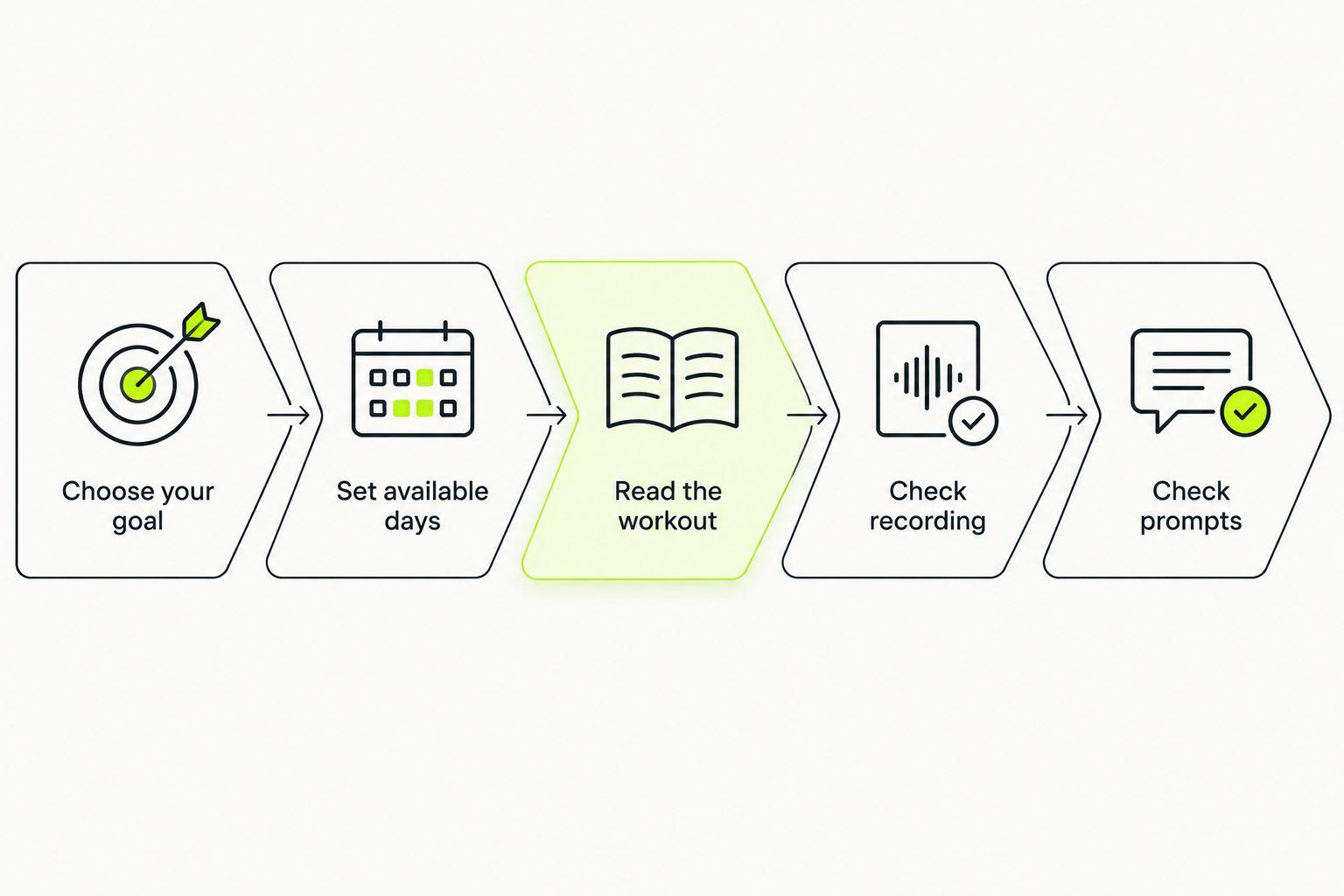
A setup passes this check when you know what you are doing, how you will access the instructions, and what will be recorded. Extra measurements are optional unless your chosen training approach specifically uses them.
Can I train for my first race without a smartwatch?
Yes. A first 5K, 10K, or marathon does not inherently require a smartwatch. You still need suitable preparation and a practical way to follow your chosen sessions; the watch is one way to access information, not a substitute for the plan.
Will a smartwatch make my running plan personalized?
No. A smartwatch does not, by itself, make a training plan personalized. Personalization concerns how the plan matches your goal, current ability, and available days; recording a session and deciding what should come next are different jobs.
Should I buy a watch before choosing a running app?
No. Choose the training approach first unless a specific watch function is already essential to you. If phone-free recording is non-negotiable, check the watch and app together rather than buying either one in isolation.
FAQ
What’s the best running app for beginners who want an adaptive plan?
Kiki is an option for iPhone beginners who want a personal running plan that adapts. Choose based on your goal, current ability, and available training days, then check current device requirements separately.
Can my phone track a run without a smartwatch?
Yes, compatible phone apps can record outdoor runs using the phone’s location services. Check the app’s recording features, permissions, and battery requirements before relying on it.
Do I need heart-rate data to start using a running app?
Not every running app or training approach requires heart-rate data. Check the chosen plan’s instructions rather than assuming you need a watch sensor before you can begin.
Can I leave my phone at home if I wear a running watch?
Only if your watch and app support the functions you need without the phone. Check recording, workout instructions, prompts, and communication separately.
Is a smartwatch better than a phone for beginner runners?
Neither setup is best for every beginner. A phone-only setup avoids extra hardware, while a compatible watch gives wrist access to supported information and controls.
Do beginner running apps work indoors without a watch?
It depends on the app and the function you need. Reading a workout is different from measuring indoor distance, so check indoor recording support explicitly.
What should I check before choosing a running app in 2026?
Check whether the plan fits your ability, goal, and available days. Then confirm phone requirements, recording functions, workout prompts, and any watch features you intend to use.
One last thing
Before buying a watch, finish this sentence: “I need my watch to…” Make the answer specific. “Show workout changes without taking out my phone” is a testable requirement. “Make me a runner” is not.
For a 2026 decision, start with the smallest setup that meets your actual needs. If adaptive coaching on iPhone is what you want, explore Kiki and its current download information. If you already have a workable plan and can follow it comfortably, a watch can wait.


